Browsing Category

Blogging

Collab with Baydian Girl: Online Tools To Enhance Your Productivity

September 10, 2020 in Blogging / Business

As a Caribbean entrepreneur and business owner, it can be difficult finding the right and affordable resources to help with productivity. There is an enormous amount of online tools available. Some are free, but many come at a cost, which by the time we convert to our currency, we may pay double the price plus tax!

That’s why I decided to collaborate with SEO guru and Barbadian-born blogger, Tamara Sykes, owner of BaydianGirl.com, to share a list of online resources we both use: apps, websites and software, to help you improve your productivity.

Tamara is a content creator and digital marketer who will inspire you to live your best life via family and style content, and teach you how to create a successful brand using Search Engine Optimization (SEO) + Blogging!

I first came across Tamara’s blog a few years ago and was immediately drawn to her style posts and bold hair colour! Today she is my go-to for SEO and blogging tips. She drops lots of FREE helpful content on Twitter @BaydianGirl and you can also purchase her e-books which contains more in-depth content on strategies you can implement to improve your search ranking and much more. If you’re looking for ways to improve your blogging and SEO, she’s definitely one you can run to.

Try these online tools to help you get through your day:

Stock Photos

Tamara:

Creative Resources:

Tamara:

Social Media Planner/Scheduler

  • Planoly
    • Instagram, Pinterest
    • Includes Stories upload
  • Later
    • Facebook, Instagram, Twitter, Pinterest
    • Paid plan for Stories
  • Hootsuite
    • Use with any 3 platforms for free. Add more with a paid plan

Tamara:

Stories Creator:

Tamara

Collecting Data

Tamara

Design & Editing Software/Apps

Tamara

Productivity Apps

Tamara

BONUS

Create short animated videos with the Headliner App.
How to build a website | Islepreneur

How To Build A Website Without Code

March 25, 2020 in Blogging / Build Your Own Website / Business

This post contains affiliate links. If you purchase a product from Bluehost by clicking the links, I will receive compensation. However, all thoughts and opinions expressed are my own.

I have been creating content on Islepreneur since 2015. If you are new here, Islepreneur is a platform to promote Caribbean entrepreneurs – their products and services and a place where they can share their entrepreneurial journey. You may want to check out the rest of the site. You may find some useful content *wink*.

For the duration of my journey with Islepreneur, I have garnered a wealth of information on content creation, blogging and even how to build a website without the headache of coding or hiring extra help. It may seem like a big task, but it’s not. I’m here to help and love that I can share what I know with you.

How to build a website | Islepreneur

I used WordPress to build this site and use Bluehost.com as the host. I chose Bluehost after research and asking other bloggers about their experience with Bluehost in comparison to other hosting companies. There are other hosting companies which allow easy integration with WordPress, but from my experience, BLUEHOST IS A WINNER! I have had no hiccups. Their service is top notch and the agents are ALWAYS QUICK TO RESPOND when I have an issue with my site. So here’s how you can get a beautiful site using Bluehost and WordPress:

How to build a website | Islepreneur

ALSO READ: 7 Things To Know Before Starting A Blog

Choose A Domain Name

First thing’s first. Choose a domain name. Even if you don’t plan on building your website right away, please secure your domain name. Do your research, pick a name that is suitable and unique for your business/blog and make that domain yours before someone else grabs it.

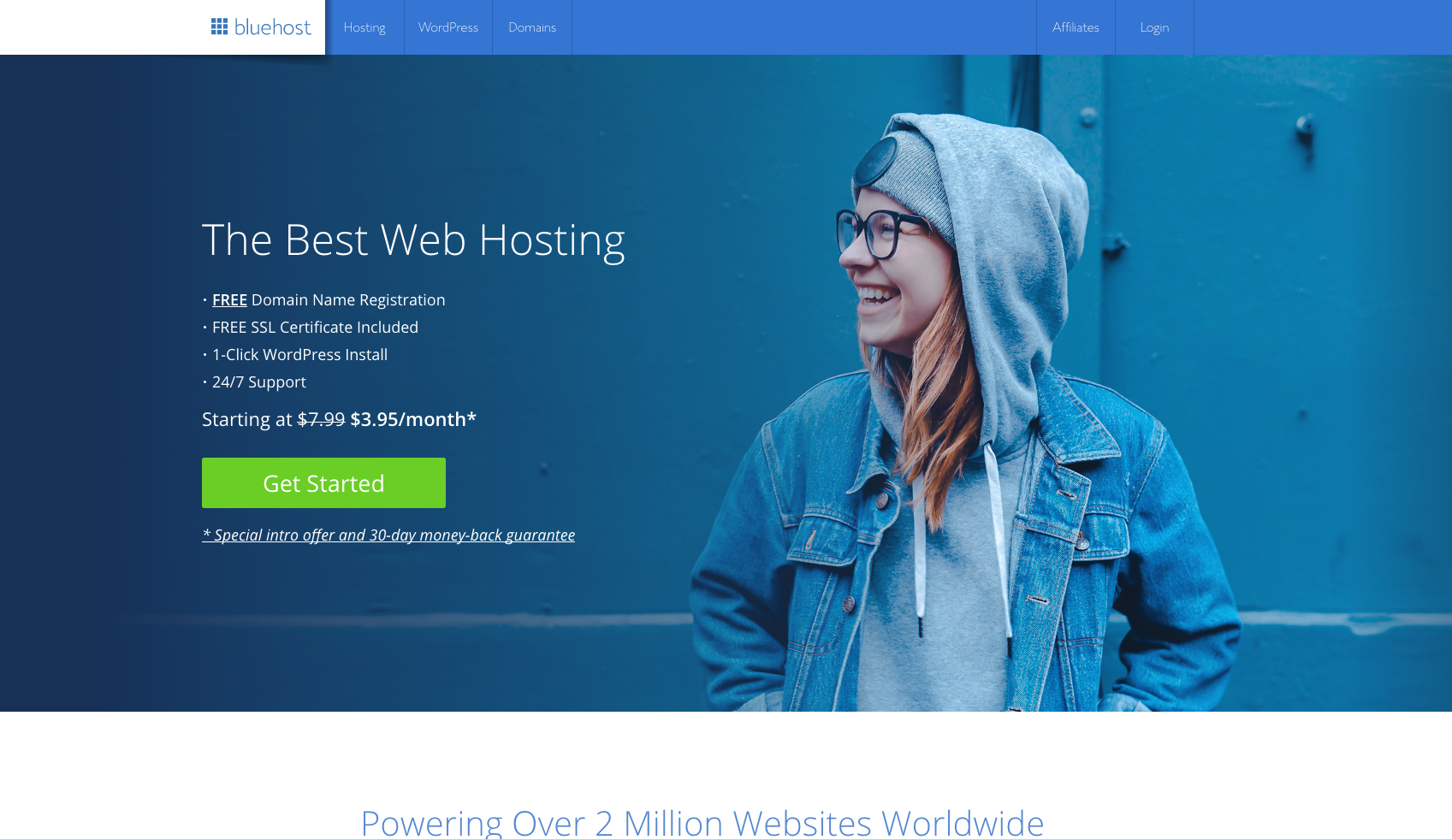
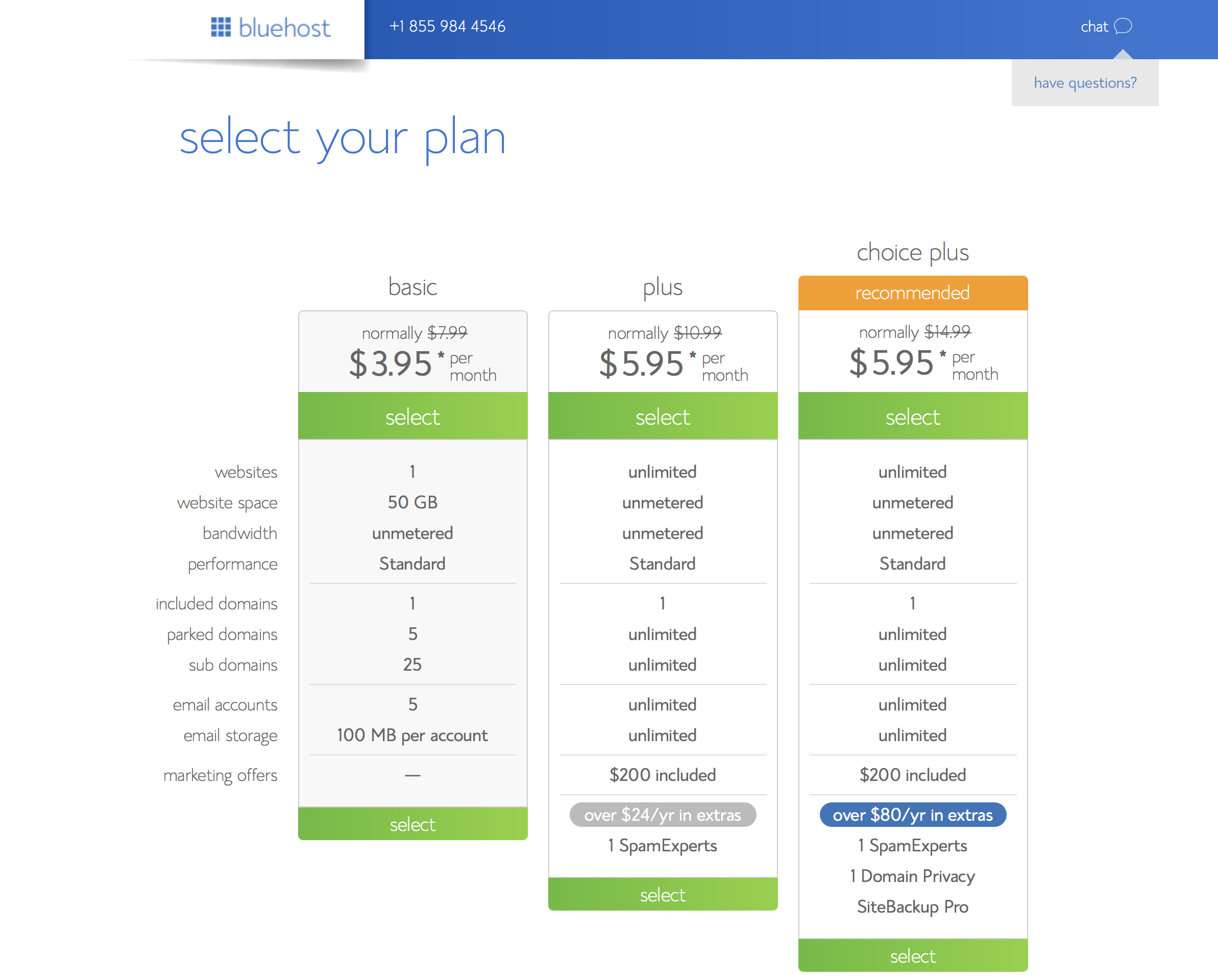
So first click ‘Get Started’ as shown in the pic above, then onto ‘Find A Plan’ where you choose the plan best for the website you’re going to create. If you’re like me, you can start of with the most affordable plan. Regardless the plan you choose, you will receive free hosting for one year. Cool huh?

How to build a website | Islepreneur

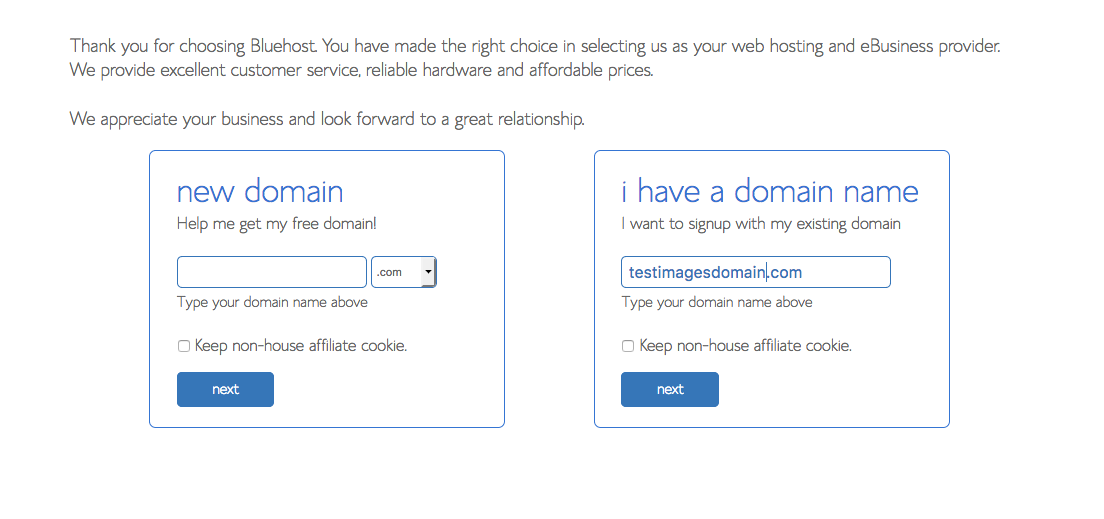
You then proceed to choose your domain name or you can skip that part until you choose one, but again, don’t wait too long to purchase your domain.

How to build a website | Islepreneur

Purchase hosting or your plan

How to build a website | Islepreneur

Since you’re just getting your foot wet with your website, the basic plan should work well for you. You can change your plan later when you see the need. There are three different options with the basic plan:

  • $2.95/month for 36 months
  • $3.95/month for 24 months
  • $4.95/month for 12 months

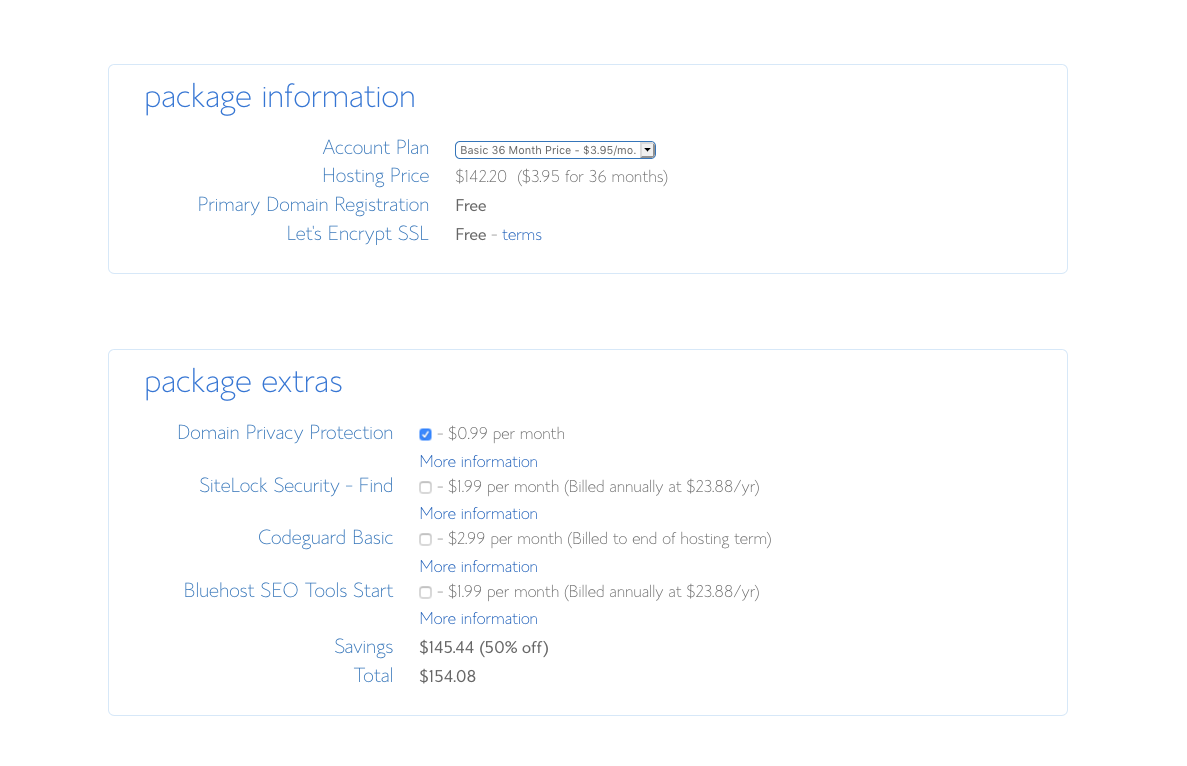
When I signed up, I chose the plan for $4.95 since I prefer to be billed annually and its cost effective especially when you convert by $2.67. You can choose to be billed monthly as well if it is easier for you. In addition, it is not mandatory to select the add-ons/package extras under ‘Recommended for You’. You can explore your website, get a feel of WordPress and better understanding of what your business will required, and add them later on.

If you have more questions about this, I am more than willing to assist.

Connect to WordPress

The next few steps are quite simple. BlueHost guides you through the process of connecting to WordPress. The steps are real easy:

  1. Choose your password
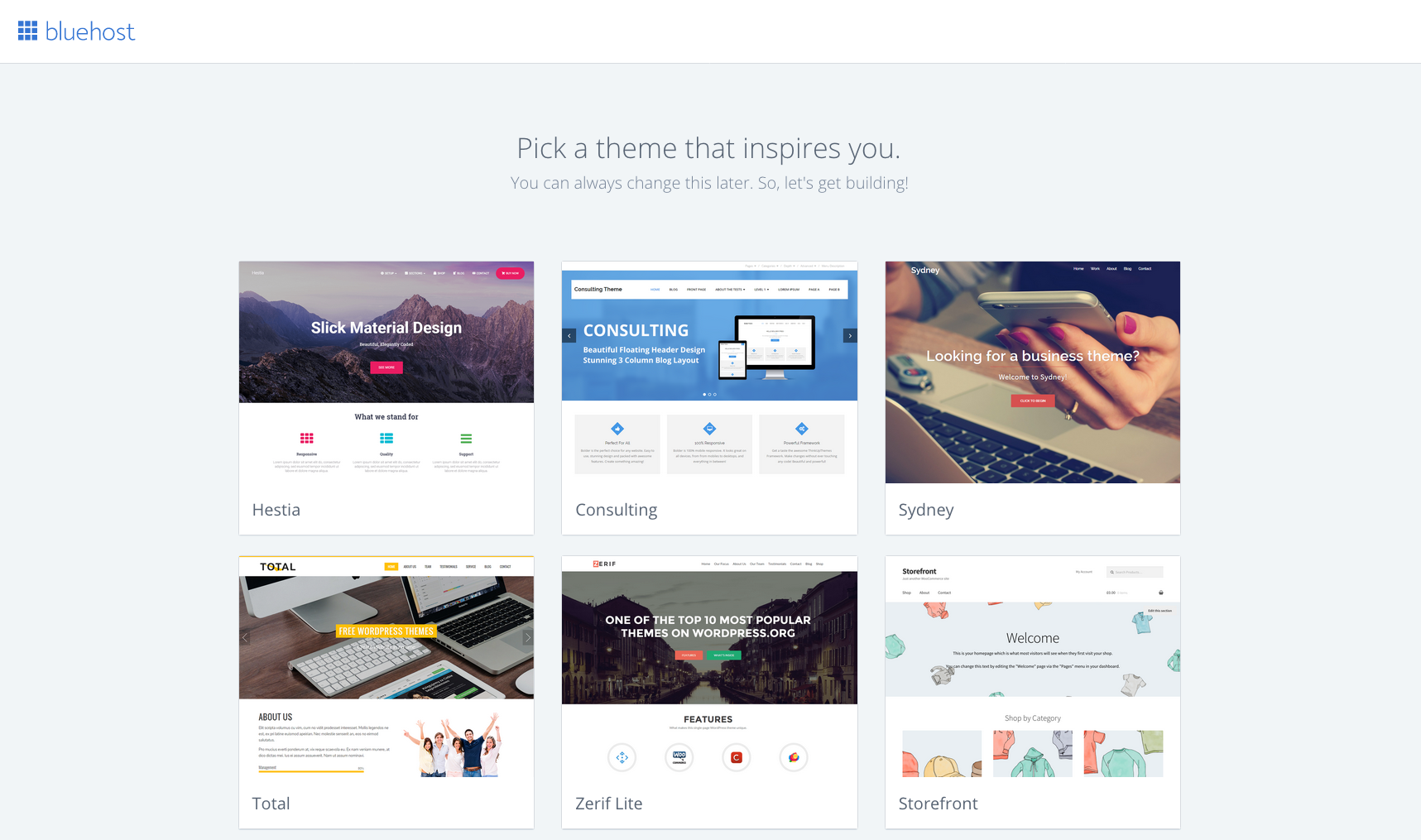
  2. Select a theme (Choose anyone for now just to get the feel of how the dashboard works. You can change it later).
  3. Start building!

How to build a website | Islepreneur

How to build a website | Islepreneur

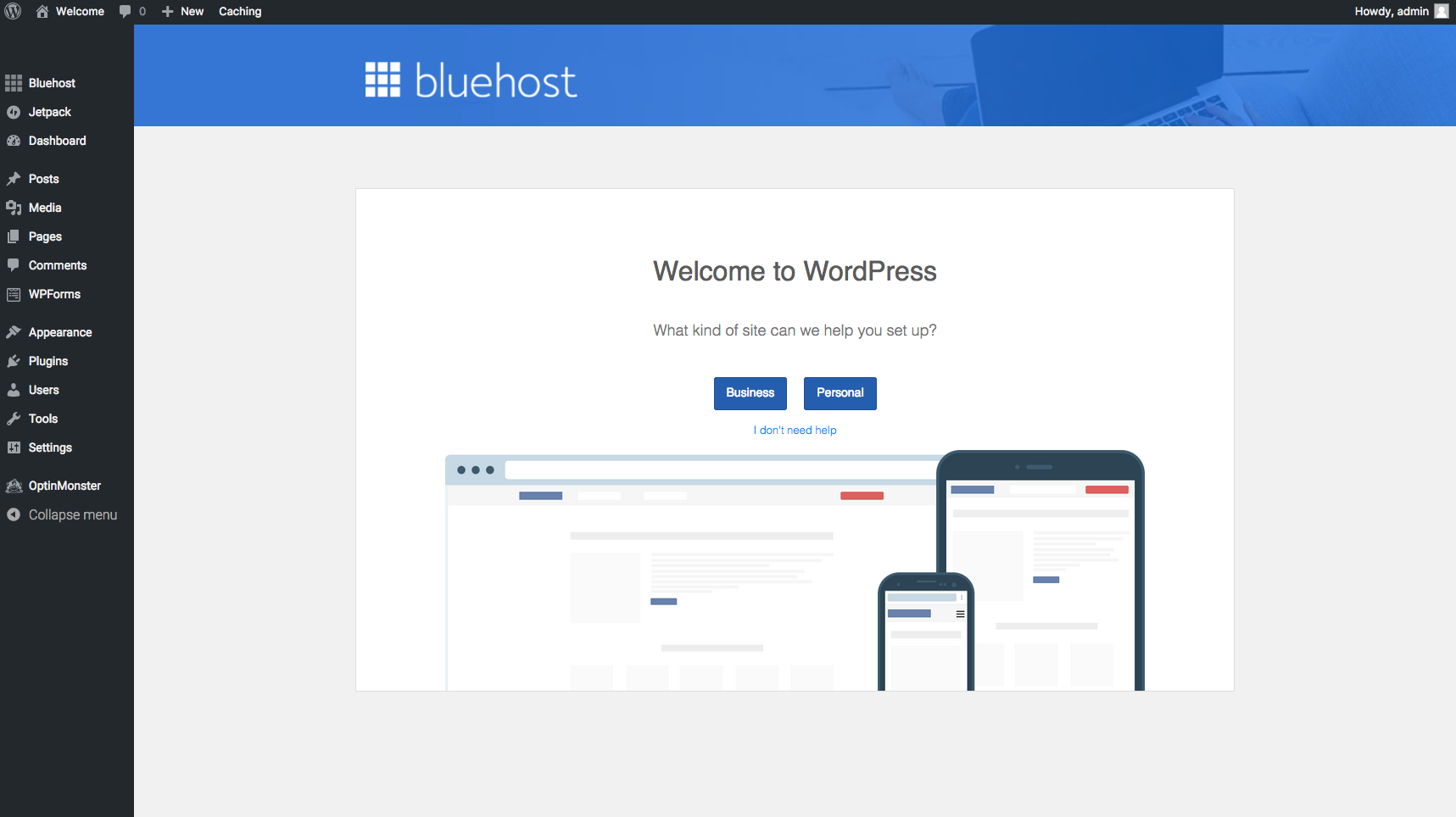
You’ll then be taken to the WordPress dashboard, which is the back end of your website. This is where all the ‘building’ goes down. Choose business or personal; whichever you believe is best for you and for what you’re trying to achieve with the site.

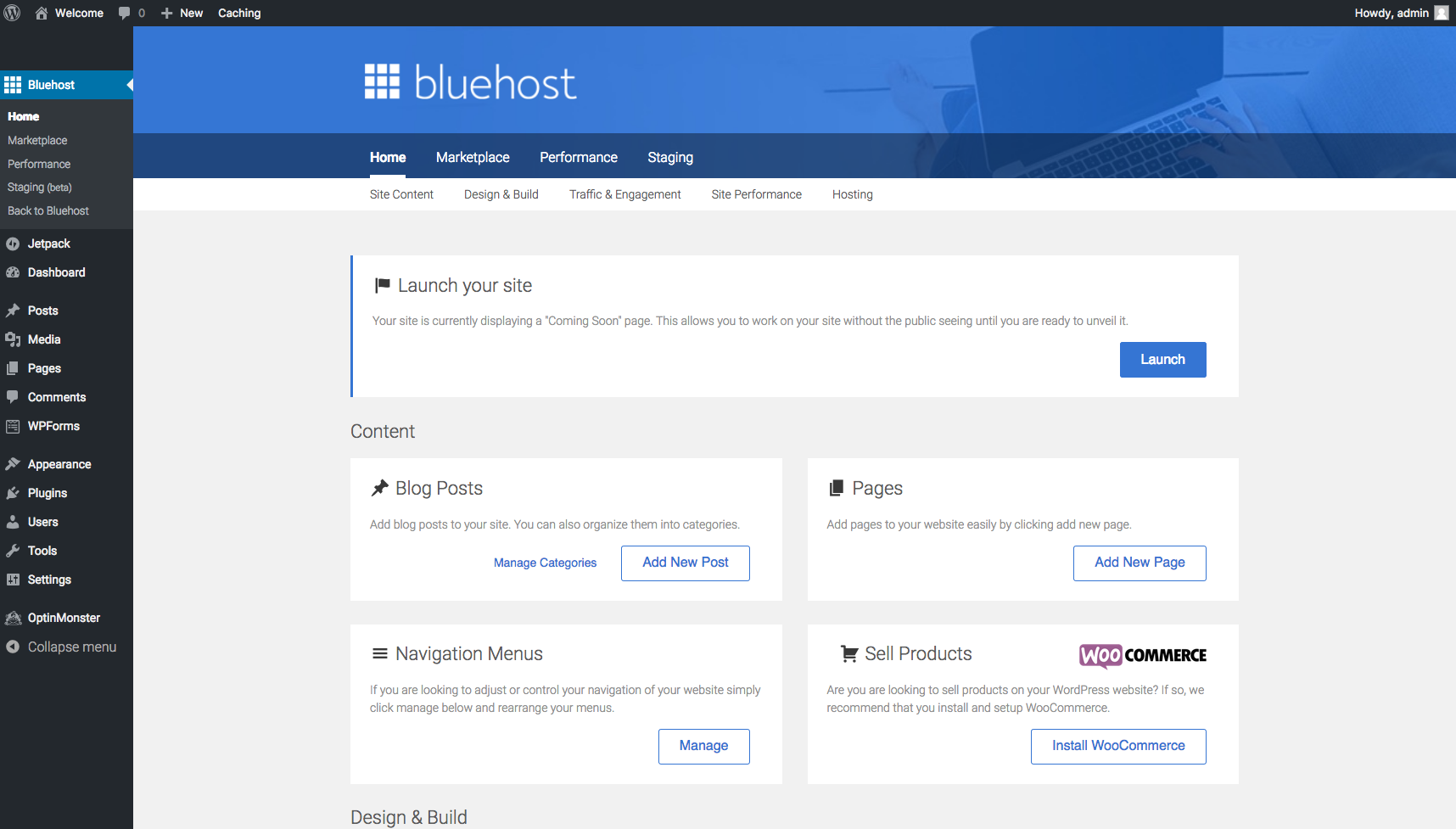
Your menu options are listed to the left. This is where you would create blog posts, pages and customize the user interface to the look and feel that you would like your audience to experience. That’s not all, though. Your site is not yet visible to the public until you hit ‘Launch’. If you’ve already customized your site and ready to let the world see what you’ve been up to, then go ahead and hit that button!

How to build a website | Islepreneur

Getting used to this interface may be a bit challenging for some, but I promise its easy to learn. If you need a detailed tutorial on how to go about customizing your site and creating blog posts/pages, let me know!

Istra Bell | Islepreneur

10 Phone Photography Tips For Bloggers

March 11, 2020 in Blogging / Business

I’ve been blogging since 2015 and one thing I’m happy I did not do is wait till I had it all together to start.

Before I got my Sony mirror less camera and had access to a DSLR, I used my phone to take pics for my website but mostly for social media posting. My phone cam was not the best but it certainly helped.

If you’re thinking of investing in a good quality camera for your blog and can afford it, go for it. However, if your phone is what you have to work with, don’t feel pressured to dig deep in your pockets to get a camera. You can apply the tips I share below to get the best out of your phone camera (which I am sure is a better quality than my previous phone cam).

1. Clean the Camera Lens

I listed this point first because I’ve seen good quality phone cameras produce low quality pics all because the lens have not been cleaned in ages. It’s like someone walking around with their glasses on, never cleaning it and wondering why they can’t see; the world becomes foggy and pale.

With my previous phone, the camera was not the best, but it was not the worst either. The first time I cleaned my lens, (can’t remember where I learned this) I was shocked! My pics became so much clearer. I always thought that my phone camera had issues. My pics were so blurry and I couldn’t figure out why until I found out that the issue may be that the lens needed to be cleaned. This made a world of difference. The camera lens is exposed so lint, finger prints and other elements will obviously get on it resulting in poor quality pics. Ensure to give your lens a quick wipe before you snap. 

2. Take Pictures In Natural Light

If your phone camera is not built to perform in low light and at night, then don’t take pics that you want to post on your business’ social feed in those settings.

Try your best to use natural light when taking photos of your products. Go outside or take the pic in front of a window/door where light comes in.

Phone Photography | Islepreneur

3. Ensure The Subject Is In Focus

Most phone cameras come with an auto focus feature so the user won’t have to do much to find the subject. However, sometimes, even with that feature, the subject is out of focus. Remember, the aim is to get a clean, blur less picture as much as possible. Look at your screen before you get that shot. If the subject is out of focus, tap your screen in the area of your subject and wait for the screen to clear. Now take your shot!

4. Avoid Zoom

One thing I’ve learned is that zoom sometimes diminishes the photo quality. The pic make look good on your phone or mobile device but on the PC, the pic may look grainy. That’s not the case with all phones, so do the test and see how it works for you. If you find that zoom on your phone is not the best, move closer to your subject to get a better shot and crop as needed.

Phone Photography | Islepreneur

5. Use Grid Lines

Grid lines help me to position my subjects and to use the rule of thirds – a well-known rule of photography. Learn more here.

6. Flash At Night May Not Be A Good Idea

I have noticed that the flash does not work well for every setting, especially at night, so I seldom use it. Again, do a test and see how your flash works at night. If it does not work well, revert to taking your pics in natural light, during the day. Your customers will appreciate it.

Related: How To Grow Using Social Media

7. Use the HDR Feature

I’ve been using this setting for a long time and never new what it meant until doing this post.

High Dynamic Range (HDR) captures detail in your photos in bright and dark areas. It works differently in iPhones and Androids, but in most cases it is a feature in camera settings you can turn off and on easily. 

My experience with this feature is that it may not always give good results. It all depends on the lighting and what you’re looking for. Again, it is always best to test with a couple shots and fiddle with HDR and see how it works with the flash.

Phone Photography | Islepreneur

8. Keep Your Hands Steady

Once you’ve cleaned your lens, and decided if you want to use HDR or not, ensure your hands remain steady for that shot. If you’re like me and don’t always have steady hands, ask someone to assist. No harm in that.

9. Phone Accessories

The only phone accessory I use at the moment is a tripod. I use it for taking pics and doing video. There are other accessories to improve your picture quality such as lens and light. You can find these on Amazon or check your local tech stores.

10. Use Google and Pinterest for Composition Ideas.

I added this point since this has helped me to improve the picture content that I put out. You may have a good camera, take clean pics, but not sure how to arrange your products or items to get a visually appealing photo of your product. I usually peruse Pinterest or just search for ideas on Google. You’d be surprised at what you’d find and how this method will get your creative mind going.

I hope you find this helpful. If there are any inexpensive tips you use to better your picture quality, feel free to share.

Cover Photo: Haron Forteau

Why More Local Businesses Should Support Blogging

November 8, 2017 in Blogging / Business

When I just started blogging, I often got this question, “What is a blog and what really do you do?” I used to laugh. People was always interested in the content I shared, but they did not understand why. At that time, I was blogging as a hobby. Attending events, sharing recaps and searching for unique items from entrepreneurs without being asked to do so. I still do that today, with a new strategy, but that’s how I started gathering content for the site. So, I thoroughly explained what I do, and the purpose for this site an and then their response will be “Oohhh, okay” with a grin. “I didn’t know people do that here” is what they would continue to say.

Two years later, blogging, which plays a huge role in most brands making it to the top, is just starting to be embraced in Grenada and there is a growing Blogging Community with more bloggers emerging, sharing on a range of niches.

Related: Spice Bloggers: Grenada’s Blogging Community

Bloggers are now being asked to attend events and post about the event on their social media handles or write a blog post describing their experience. This form of marketing is slowly being implemented in marketing strategies by some businesses and event organizers, but unfortunately, many businesses today still see blogging as just someone’s hobby and not a revolutionary marketing tool. Take a look at some of the reasons why local businesses should support blogging:

  1. Publicity

This is possibly the most obvious reason why any business should include blogging in their marketing campaign. Blogging harnesses brand awareness. The more a business share about their products, the more people will become aware of what they are offering.

      2. Reaching Audiences

Businesses who hire or use bloggers with growing audiences to market their products or services, tend to reach a much wider audience. When a business taps into the bloggers’ audiences, the products are services being marketed will reach potential customers the business may not be able to reach on its own.

      3. Trust

Consistent blogging coupled with strategic social media usage helps to build trust from your audience. When people see that you are consistent with sharing relevant content, especially to support your brand, they tend to look to you for what is next and start trusting that what you put out will be worth their pennies.

      4. It sets you apart from the competition.

Providing consistent relevant content (clean pictures and story telling) to support your brand will no doubt set you above the rest.

      5. Tell your story.

Blogging allows you to share all the content you may not want to include on a Facebook or Instagram post. Also, it is much easier to read a long post from a website than from a social media page.

[ctt title=”5 reasons Caribbean businesses should include blogging in their marketing strategy” tweet=”5 reasons Caribbean businesses should include blogging in their marketing strategy https://ctt.ec/8U0MU+ via @islepreneur” coverup=”8U0MU”]

There are so many more benefits for local businesses when they include blogging as part of their marketing strategy. For those who are looking to start, I get it. Blogging takes time and frankly, not many people understand how to do it well, but there are ways to work around it. For example, if you cannot find the skills within your organization for social media and blogging, you can definitely look into contracting experienced freelance bloggers who can meet the needs of your company.

Grenadian Blogs to Follow | Islepreneur

Grenadian Blogs to Follow

December 27, 2016 in Blogging / Business / Lifestyle / Things Grenadian

One thing I’ve learned throughout my first blogging year, which I kinda-sorta celebrated in October 2016, is that bloggers/entrepreneurs NEED SUPPORT. I have been an advocate for supporting local long before I started blogging, but over the last few months I’ve seen how absolutely important for us locals to support our own. Read more…

7 Easy Steps To Starting Your Blog #CBW2016 | Islepreneur

7 Easy Steps to Starting Your Blog #CBW2016

December 8, 2016 in Blogging / Business

Since it’s Caribbean Blogger’s Week 2016 #CBW2016, I thought what better way to celebrate blogger’s week than with a few tips on how to start a blog. There are no prerequisites to this, you just need some determination and persistence and you’re good. Read more…

Back to top